Depth UI Launcher
A layered Android launcher built for customization, movement, and control.
Depth UI Launcher is a modern Android home screen replacement designed for users who want more than a standard app grid. It gives your phone a deeper, more personal launcher experience with layers, gestures, custom backgrounds, widgets, folders, themes, docks, and visual effects.
Instead of placing everything on one flat home screen, Depth UI Launcher lets you organize apps, shortcuts, folders, widgets, and backgrounds across multiple layers. Build a clean setup for everyday use, separate apps by purpose, customize each layer, and move through your launcher in a way that feels natural.
Depth UI Launcher is currently in closed beta testing. Testers help improve performance, compatibility, layout behavior, Pro features, and the overall launcher experience before wider release.
[Join the Closed Beta]
[Share Feedback]
What Makes Depth UI Launcher Different?
Layered Home Screen
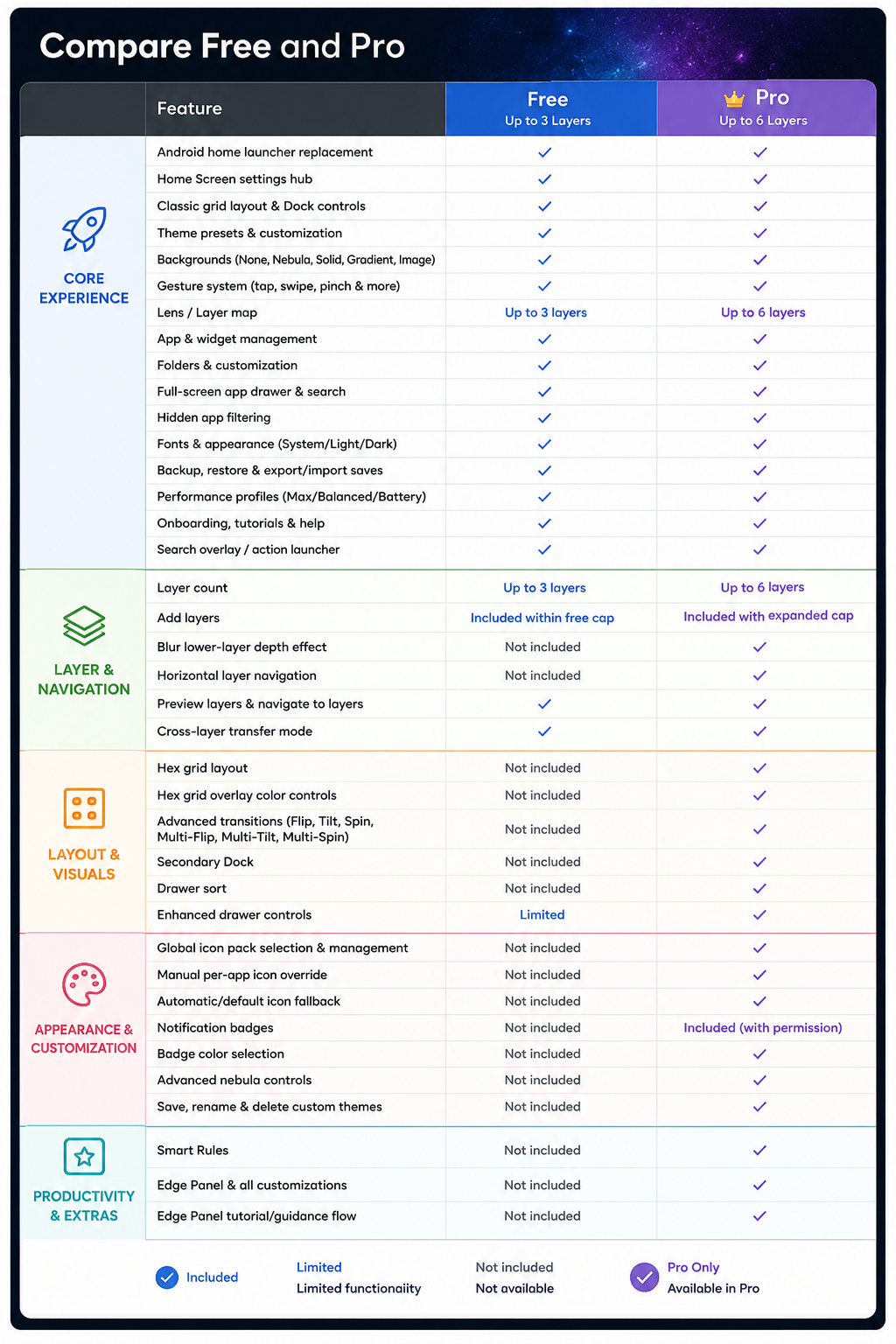
Depth UI Launcher is built around layers. Each layer can have its own purpose, layout, background, widgets, folders, and app setup. The free version supports up to 3 layers, while Pro supports up to 6 layers.
Custom Visual Style
Choose preset themes, customize backgrounds, adjust halos, use outlines, tune motion effects, and personalize the launcher’s overall look. Depth UI Launcher is designed to make your home screen feel more alive without forcing one fixed style.
Gesture-Based Control
Use customizable gesture actions such as tap, double tap, long press, swipe, pinch, and two-finger tap. Open the drawer, launch Lens, add apps, add widgets, open settings, or move through your launcher faster.
Lens Layer Map
Lens gives you a visual overview of your layer stack. Preview layers, jump between them, and use cross-layer transfer mode to move items across your launcher.
Dock, Drawer, Widgets, and Folders
Depth UI Launcher includes practical home screen tools like dock controls, a full-screen app drawer, hidden app support, widget placement, folder creation, folder styling, and app picker tools.
Backup and Recovery
Save your launcher setup, export and import saves, restore from slots, recover widgets after restore, reset defaults, and use recovery tools when needed.